Advanced Shopify Exit Intent & Shopify Checkout Optimization for Enterprise Stores

You’ve done the hard part. People found your site, poked around your product pages, added the right size to cart, then, suddenly disappeared. Poof. Another “almost” joins the pile. If that sounds familiar, welcome to the club nobody wants to be in: Shopify cart abandonment is the most expensive mystery in ecommerce.
Here’s the truth developers learn fast: the storefront gets all the love, but the money is made (or lost) in the Shopify checkout. That final stretch compresses every anxiety the shopper has been quietly carrying: shipping costs, delivery timing, return rules, payment trust, “will-this-fit?” doubt. If we don’t answer those questions gracefully, we invite the tab close.
The good news? We’re not stuck with a gray, one-size-fits-everyone flow anymore. With Shopify checkout extensibility, Shopify finally gives us a durable way to add logic, UI, and brand context right where it matters. We can validate data, surface the exact reassurance a buyer needs, nudge the right payment option to the top, and slide in relevant upsells that don’t feel like traps.
When someone’s cursor starts drifting toward the address bar or their thumb hovers over the back button, we can do better than a “10% off?” pop-up thrown into the void. Thoughtful Shopify exit intent systems are the perfect way to have a final, respectful conversation at the door: “Do you need faster shipping? Prefer PayPal? Want to save your cart for later?” It’s recovery, not interruption.
Why The Checkout Matters More Than Ever
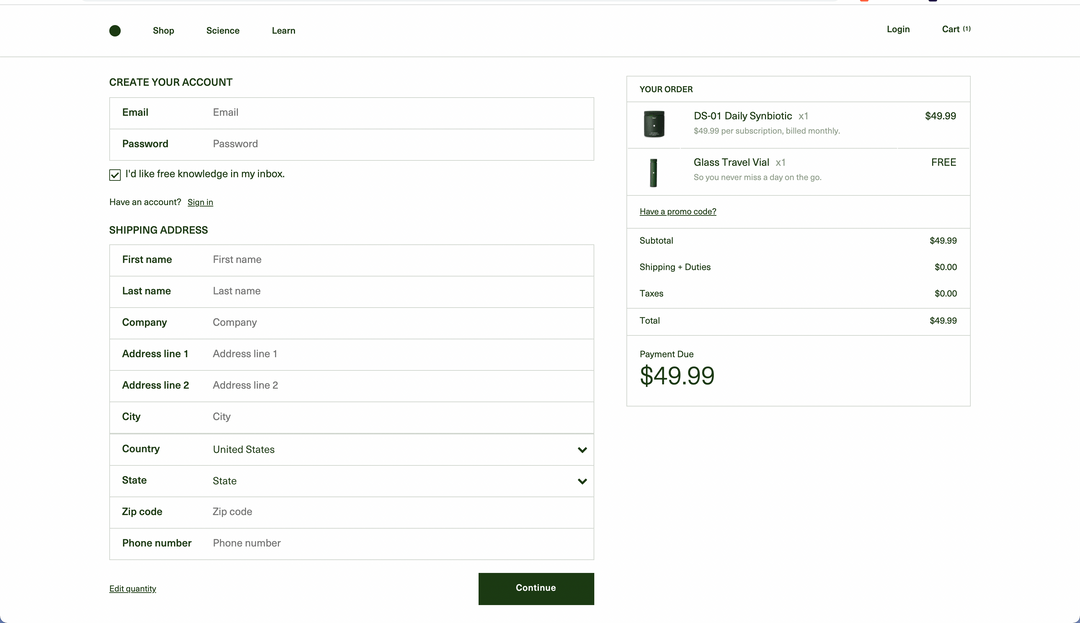
Attention is expensive. Traffic is volatile. Margins are thinner than they used to be. If we burn paid clicks on a leaky funnel, we’re basically donating budget to the bounce rate. That’s why the Shopify checkout is the most leveraged place a developer can spend time in 2025.
Buyers expect a lot now, speed that doesn’t stutter on mobile, instant trust cues, clear delivery math, and a payment method that feels native.
They also expect personalization without friction: “show me the right shipping option for my postcode, put Apple Pay first on my phone, don’t make me re-type my address.” When those expectations aren’t met, Shopify cart abandonment isn’t a surprise; it’s the default.
Here’s where the platform shift matters. Shopify checkout extensibility turns checkout from “locked template” into “controlled surface.” We can inject just-in-time information (returns, duties, delivery windows), run guardrails with server-side logic (age checks, PO number requirements, address validation), and reorder or hide payment/shipping methods with precision.
Then we can pair all of that with considerate Shopify exit intent patterns, on desktop and mobile, that ask the right question at the right moment instead of shouting a coupon code. In other words: the last step is finally buildable.
Shopify Plus Checkout Customization
If you’ve ever built on Shopify before 2022, you’ll remember how checkout used to feel. You could tweak some CSS, maybe change a logo, and that was it. Anything deeper? Forget it. The whole thing was bolted shut unless you were on Plus, and even then, you were cutting into checkout.liquid and hoping the next platform update didn’t break your work.
Now the landscape’s different. With Shopify checkout extensibility, Shopify basically tore out that old wall and replaced it with something developers can actually build on.
Here’s the quick rundown:
- Branding API: Lets you finally ditch the “Shopify gray” and carry your fonts, buttons, and color scheme all the way through to Shop Pay. No more brand identity disappearing at the finish line.
- UI extensions: These are the little blocks you can drop in where they make sense. Banners for shipping info, upsells that don’t feel pushy, even a donation prompt if that’s on-brand.
- Shopify Functions: You can run logic natively at checkout, validate a PO number, hide a payment method for certain customers, shuffle shipping options around. It’s clean, fast, and doesn’t rely on third-party scripts.
- Checkout events: Hooks that trigger when something happens in the flow. Perfect for real-time adjustments.
If you’re on Plus, you’ve still got Shopify Scripts too. Scripts can run custom discount logic or change shipping and payment rules on the fly. Put them together with Functions and you can build surprisingly complex flows: wholesale customers see one set of rules, retail buyers see another, all without breaking the upgrade path.
Then there’s scale. Plus is built to handle traffic spikes- Black Friday, product drops, influencer campaigns. I’ve seen stores run thousands of orders a minute through checkout without blinking. From a developer’s side, that reliability matters. You don’t want to be debugging a fragile checkout when a promo goes viral.
What all this boils down to is simple: on Plus, checkout isn’t a locked door anymore. It’s a proper conversion surface.
Exit-Intent Systems on Shopify: Beyond Popups
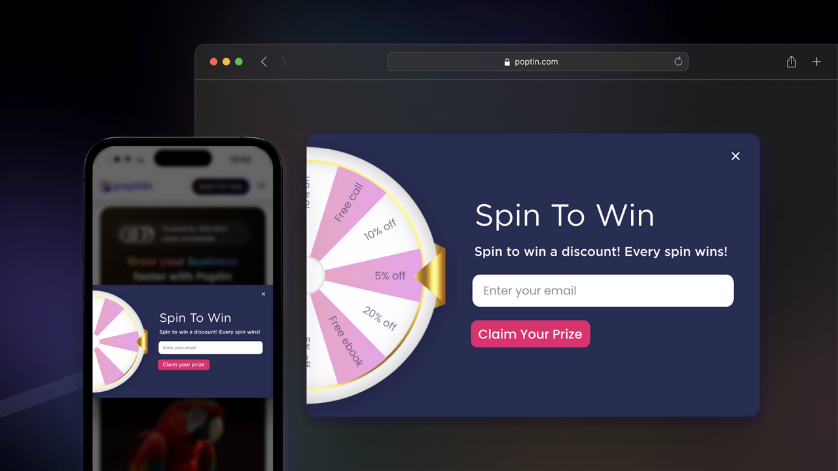
When most people think about Shopify exit intent, they picture the same thing: a generic little popup yelling “Don’t go! Take 10% off.” You’ve seen it a hundred times. It works sometimes, sure, but it also feels a bit like desperation.
Here’s the reality: exit intent isn’t the popup itself. It’s the signal. On desktop, it’s the mouse drifting toward the top bar. On mobile, it’s the back button, or someone pausing just a little too long like they’re about to give up. That’s the moment to do something useful, not just wave a coupon code in their face.
The best stuff I’ve seen (and built) makes exit intent part of the Shopify checkout, not an afterthought stuck on top of it. A couple of examples:
- Cart-based nudges: If free shipping kicks in at $100 and the customer’s sitting at $92, why not surface a quiet banner that says, “Add one more item and shipping’s free”? It feels like a tip, not a bribe.
- Trust boosters: Lots of people leave because they’re nervous about returns or shipping timelines. A well-placed line like “Order by 2pm for same-day dispatch” can stop that hesitation cold.
- Ask why: Sometimes you won’t save the sale, but you can grab the insight. A one-line exit survey - “What stopped you today?” - is gold for the next iteration.
- Loyalty reminders: If someone’s in your rewards program, show them the points they’re about to leave on the table. Nobody likes wasting value they’ve already earned.
This is where Shopify checkout extensibility really shines. Instead of tossing another script on the pile, you can use UI extensions and Functions to make these moments part of the native checkout.
Toolbox & Tactics for Exit-Intent Popups

You don’t have to reinvent the wheel every time you want to run Shopify exit intent campaigns. There are solid apps out there that handle the heavy lifting, though I’ll be the first to say, some of them are bloated or overkill. The trick is knowing which ones actually play nice with Shopify checkout and which ones just slap a modal on top of everything.
A few worth mentioning:
- OptiMonk: Good if you want personalization. You can target by cart contents, browsing history, or even location. It’s a bit more than just “throw a discount and pray.”
- Wisepops: Quick to set up, and the templates don’t look like they were made in 2012. Solid if you need clean designs fast.
- Instant: Lightweight, which is nice if you care about page speed (and you should). I like this one for mobile because it feels less clunky than some of the bigger tools.
- Privy (and similar follow-up tools): Useful when you want your popup to tie directly into emails or SMS flows. The popup is only half the story; the recovery sequence afterwards matters too.
Quick Tips for Using Shopify Exit Intent Systems
So what do you actually do with these? A couple of tactics that work better than the old “10% off coupon” approach:
- Delay the trigger. Don’t fire the popup two seconds into checkout. Give the shopper 10–15 seconds, or wait until they’ve scrolled a good chunk of the page. Timing matters more than you’d think.
- Mobile-specific rules: On phones, there’s no mouse to track. Apps worth using have back-button or tab-switch detection. If they don’t, you’re missing most of your traffic.
- Make closing easy: Nothing kills trust faster than a popup you have to fight to exit. Always include a visible close option.
- Experiment with form, not just content: Gamified popups (spin-the-wheel, scratch cards) are gimmicky, but they do work in certain niches. For higher-end brands, a softer survey-style exit intent can actually convert better than a discount.
- Test, test, test: Exit intent is one of those things that lives or dies by context. What works for a beauty store might tank for B2B. If you’re not running A/B tests, you’re basically guessing.
One last point: don’t let an app do what Shopify checkout extensibility can already do natively. If you can handle banners, validation, or dynamic offers inside checkout itself, that’s usually the cleaner play. Use apps for what they’re good at (fast deployment, surveys, gamified UX), but lean on extensibility for performance and long-term stability.
Checkout & Cart Recovery Playbook
Here’s the thing about Shopify cart abandonment: most of is caused by the basics. Too many form fields. Hidden shipping costs. Payment methods that don’t match what the buyer wants. If you’ve ever run through a checkout on your phone and given up halfway, you know exactly what I’m talking about. So let’s break down the pieces that actually move the needle for conversion recovery.
1. Cut the friction
- Guest checkout: forcing account creation is still one of the fastest ways to lose a customer. Let people buy first, register later if they want.
- Fewer form fields: only ask for what you need. Do you really need a company name from every single buyer? Probably not.
- Upfront shipping costs: don’t hide fees until the last step. Show totals early so people don’t feel ambushed.
I’ve seen stores drop abandonment rates by double digits just by trimming two or three fields and surfacing shipping fees earlier. It’s not exciting work, but it’s effective.
2. Lean on trust and psychology
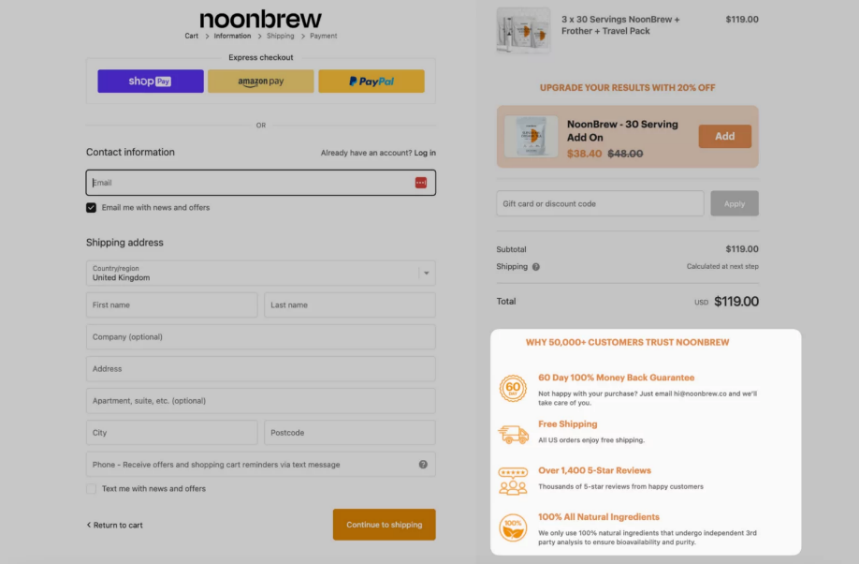
A lot of hesitation in Shopify checkout has nothing to do with logic—it’s gut feeling. People don’t trust the process, so they bail. Developers can help here too.
- Add trust badges (SSL, PayPal, Shop Pay logos).
- Highlight guarantees: free returns, money-back, same-day dispatch.
- Social proof: reviews or even just a subtle “4,200+ orders shipped” line.
These little nudges stack up. They make checkout feel safe, not risky.
3. Keep carts sticky
Nothing’s more frustrating than filling a cart on desktop, switching to mobile, and finding it empty. Persistent carts, where items sync across devices for logged-in users, are one of those “invisible” CRO wins.
Even better? Combine persistent carts with recovery emails. If someone abandons at checkout, send them a one-click link to pick up exactly where they left off. Tie this into your exit intent logic and suddenly the recovery net is a lot tighter.
4. Use personalization where it counts
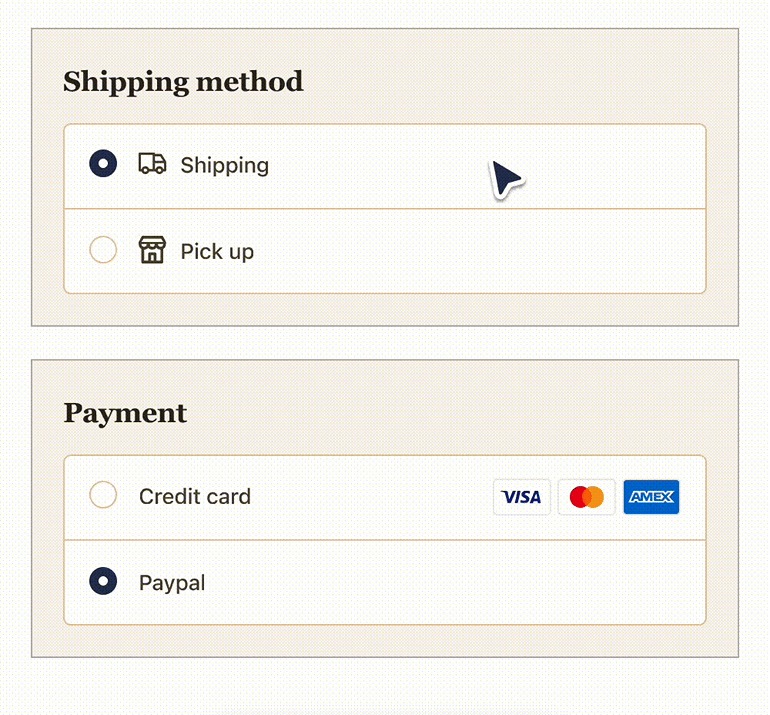
This is where Shopify checkout extensibility really makes an impact. You can tailor parts of the flow in ways that feel helpful, not pushy.
- Show payment methods based on device (Apple Pay first on iPhone, PayPal on desktop).
- Offer location-specific shipping (bike courier for local customers, express courier hidden for remote ones).
- Trigger upsells based on what’s already in the cart (socks with shoes, charger with camera).
It’s personalization that’s invisible to the customer, they just think checkout “works” for them.
5. Connect checkout to recovery flows
Don’t think of exit intent and checkout optimization as separate. They work best when they’re chained together.
- Someone hovers toward leaving → trigger banner with reassurance.
- If they still leave → recovery email goes out with saved cart and maybe a tailored incentive.
- If they return → checkout is already optimized to be faster and more trustworthy than last time.
This is where those apps (OptiMonk, Wisepops, etc.) and Shopify’s native tools can play nicely together.
6. Test everything
Here’s the trap a lot of stores fall into: they install a shiny new Shopify exit intent app, or they tweak a checkout field, and then they just assume it’s better.
If you’re serious about reducing Shopify cart abandonment, you’ve got to treat checkout changes like experiments, not magic tricks. Every adjustment, whether it’s a new banner, a reordered payment method, or a discount rule written in Shopify checkout extensibility, should come with a way to measure the impact.
A few simple but effective tests:
- CTA wording: “Pay now” versus “Complete my order” might look like a small swap, but one can feel like a demand while the other feels like encouragement. Only one way to know which works.
- Button placement and color: do your primary actions stand out, especially on mobile? Test variations and see what gets more people over the finish line.
- Upsell positioning: does an upsell work better above the payment section, or after shipping options? Move it around and track the numbers.
- Exit-intent timing: fire the popup as soon as the cursor leaves the window vs. waiting three seconds. You’ll probably be surprised at which performs better.
Don’t limit yourself to A/B tests on one element at a time. Sometimes multivariate testing, like trying combinations of form fields, copy, and trust badges together, shows you patterns you’d never spot otherwise.
Shopify Exit Intent: Pitfalls & Best Practices for Devs
It’s tempting to throw everything you’ve got at the checkout, - apps, banners, popups, discounts, hoping one of them sticks. But a cluttered Shopify checkout isn’t better than an abandoned one. If anything, it makes Shopify cart abandonment worse.
Here are a few traps I’ve seen (and fallen into myself) when building exit-intent systems and checkout customizations:
- Don’t overload checkout with scripts: The old way of handling Shopify exit intent was often just bolting on third-party JavaScript. The problem? Every extra script can slow checkout down, and nothing kills conversion faster than lag on the payment page. If you can handle it with Shopify checkout extensibility, do it natively.
- Keep it subtle: Exit-intent popups are like seasoning, you need just enough. Fire three different offers at once and you’ll overwhelm people. Stick to one clear incentive or reassurance, and make it easy to dismiss. Shoppers hate feeling trapped.
- Test on mobile separately: Desktop logic doesn’t translate cleanly to mobile. There’s no cursor to track, and people switch tabs constantly. If your exit triggers only make sense on a big screen, you’re ignoring the majority of your traffic.
- Respect the brand: Not every store should be running gamified spin-to-win wheels at checkout. For some, it works. For others, it feels cheap. Build exit intent that matches the brand’s tone - playful for DTC lifestyle, reassuring for B2B, value-driven for subscription.
Good Shopify exit intent isn’t about throwing up walls. It’s about removing just enough doubt to keep the customer moving forward.
When to Call in Expert Help
Not every merchant has the time, or the in-house team, to mess with Shopify checkout extensibility. Writing Functions, building UI extensions, and validating data all require a different skill set than tweaking a theme or installing an app.
I’ve seen plenty of stores try to duct-tape checkout customizations together with apps and scripts, only to end up with something slow, fragile, and impossible to maintain.
That’s when it makes sense to bring in someone who lives and breathes this stuff. A developer who already knows how to stitch Shopify exit intent into the checkout flow, set up logic with Functions, and make sure the whole thing is upgrade-safe.
Platforms like Storetasker exist for exactly that reason. They match merchants with vetted Shopify developers who’ve built these systems before. Instead of spending weeks trial-and-error in a dev store, you can have someone step in and build a clean, reliable solution that actually moves the conversion needle.
Ready to address Shopify exit intent the right way? Start your project today.


Shopify Expert?


.svg)

.svg)
